As a Sr. Inclusive Designer, I used my expertise to advise designers, product leaders and web engineers on best practices for accessibility and inclusive design. In collaboration with multiple design and development teams, we work together on accessible concepts and design solutions that strive to go beyond WCAG 2.1 AA criteria that create delightful, accessible experiences for users with disabilities. In this project, I worked on a redesign of a vaccine schedule flow at a major U.S. pharmacy.
Throughout the design and development process, I advocate for the needs of users with disabilities, health equity access for historically oppressed communities, and linguistic inclusion for our Spanish-speaking customers. This work is ongoing.
Some information is removed or modified due to confidentiality.
Project overview
A leading U.S. pharmacy needed to update their vaccine scheduler flow to be integrated and unified with other lines of business with the goal of using unified components to make it easier for patients to schedule a vaccine. The current experience is outdated and lacks key accessibility features. This flow is web only.
Team
7 Experience designer (UX/UI)
1 Sr. Accessibility Designer
15 Engineers (Web, A11y QA)
5 Product Owner/ Scrum Master
2 Content Strategists
1 Information Architect
Goals
- Advise and collaborate with the UX/UI designer to create an updated design that is accessible to all and follows the pharmacy’s new design system
- Develop a more accessible and intuitive experience for all users
- Improving healthcare access and equity for all users through design
My role
- Advise and collaborate with Experience Designers, Product Leaders and Design Lead Stakeholders
- Research best practices and contribute to team discussions around internal design accessibility standards and recommendations
- Annotate web designs (desktop, mobile screens)
- Offer guidance to developers regarding a11y functionality requirements
Collaborating with UX/UI
Through Agile facilitated ceremonies, I met daily with UX & UI designers, Content Strategists and Product Leads to deliver feedback and key accessibility concepts to their design work, from how we are implementing our design system components on a page to content alignment. Throughout project iterations, I prioritize the needs of users with disabilities and health equity access with research-backed design solutions.
The following is an example of how my input has led to more accessible and inclusive design choices.
Some information is redacted for confidentiality.
Previous experience challenges and barriers:
- Each page of the flow is a form, and there was a lot of text on each page containing important vaccine information for the patients, like state eligibility requirements or risk factors, that vary from vaccine to vaccine. This was a large cognitive load on users to process information, and access with assistive technology.
- Depending on what part of the website a user was on, scheduling a vaccine looks different on the Pharmacy side vs. Clinic side and made it difficult for users who landed on the Clinic pages who wanted to schedule at a Pharmacy location, and visa versa.
- Interactive elements, like buttons and links, were embedded in fieldset groups which makes it both confusing from a keyboard tabbing order perspective and harder to discover for assistive tech users.
- The content language used medical/clinical language, which made it difficult for users to understand.
- Spacing inconsistencies between components and body copy, which made it harder to digest content
New experience makes several improvements for both accessibility and user experience:
- The new design allows for users to choose more locations no matter where they entered the site. Scheduling a vaccine became an integrated, cohesive experience.
- Created custom radio buttons that are thoughtfully grouped in a visually digestible way. On the “Choose your Date and Time” pages, these custom radio buttons were grouped by fieldset legends so they are easier for screen reader users to access. “Available appointments” were broken up by: morning, afternoon, and evening groups for up to 28 days out from today’s date.
- To alleviate cognitive load and reduce the amount of content on a page, some vaccine information, like state eligibility or risk factors, we’re added to standard modal dialogs activated by buttons that are grouped with the relevant question. Buttons were not embedded within a component.
- Updated clinical language to use words that more users would better understand. For example, instead of saying “Are you immunocompromised?” we reframed the question to ask “Do you have a weakened immune system?”
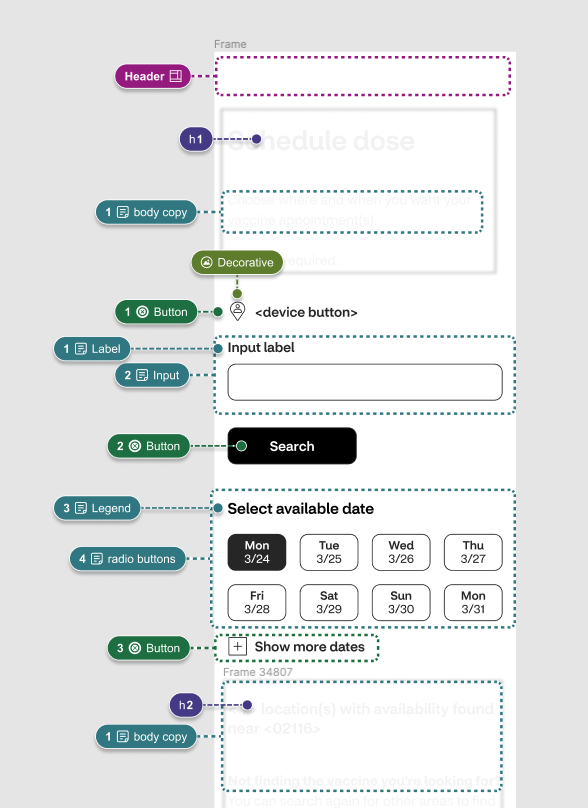
Annotating the experience for accessibility
This experience is a web-only application, designed to be responsive for Desktop, Tablet and Mobile views.
Following our inclusive design workflow, I work closely with our experience designers and content strategists, so that feedback is delivered as they are working and not at the end when there’s not enough time to implement change. During this time I am capturing the following in group meetings and asynchronous reviews:
- Review for visual design accessibility best practices following WCAG 2.1 A & AA standards
- Produce accessibility specifications
Once the design is ready for hand-off, I annotate the design using the pharamacy’s established Figma a11y annotations kit to deliver to developers paired with a hand-off call with design, developers and product owners to ensure the design intent is understood and accessibility documentation can be reviewed. I work iteratively when delivering a11y annotations to improve my communication and documentation. Below are samples.
Some information is redacted for confidentiality.


Continued support for engineers
I help support engineers in their QA testing steps and code questions as they develop designs. And continue to work collaboratively with engineers to remediate defects found in the audit process and support in the following ways:
- Review audit findings with our accessibility testing engineers
- Facilitate solutions for design-specific defects with design stakeholders and engineering teams
- Work with product leads to prioritize accessibility remediation steps and future enhancements
 Portfolio